

Guide for QR Code Function of Algorithm mode
Algorithm
Algorithm displays scripts that you input on your scientific calculator. It also provides functions below.
 |
You can download your script data as document file. |
|---|---|
 |
You can get history data. |
Note
In the document file, the following scripts are converted into alternate fonts.
| script | alternate font |
|---|---|
 |
↺ |
 |
⤴ |
Scratch Blocks
Your scripts are converted into Scratch Blocks according to the following conversion table.
| script | block |
|---|---|
| Move |  |
| Turn |  |
| Direction |  |
| Go to x,y |  |
| Pen Down |  |
| Pen Up |  |
| Set Variable to |  |
| Ask and Assign | 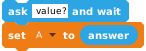 |
| Comment |  |
| Show Result |  |
| Style |  |
| Wait |  |
| Repeat |  |
| Repeat until |  |
| If Then |  |
| If Then Else | 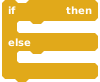 |
| Abs |  |
| e■ |  |
| 10■ |  |
| √ |  |
| ln |  |
| log |  |
| sin |  |
| cos |  |
| tan |  |
| sin-1 |  |
| cos-1 |  |
| tan-1 |  |
| Intg |  |
| = |  |
| > |  |
| < |  |
| + |  |
| − |  |
| × |  |
| ÷ |  |
* An argument value θ of « Direction » command is converted to 90°-θ
* Scripts other than the above are converted into plain text.